


Views: 104 Author: Site Editor Publish Time: 2026-08-12 Origin: Site


LCD contrast ratio describes the difference between the brightest white and darkest black a display can produce under specified test conditions. It strongly influences text readability, dark-scene detail, image depth, and the visual separation between interface elements.
For industrial buyers, however, a higher contrast-ratio number does not automatically mean a better display. Ambient light, viewing angle, panel technology, brightness, surface reflection, touch glass, optical bonding, and temperature can all change the contrast users actually see.
This guide explains how to interpret 500:1, 1000:1, 1500:1 and higher LCD contrast ratios, what static contrast means in practice, and how to choose the right TFT display for indoor, industrial, medical, automotive, kiosk, and outdoor applications.
500:1 class: often sufficient for basic HMIs, instruments, and cost-sensitive indoor equipment when users view the display near the intended direction.
1000:1 class: a stronger starting point for modern industrial HMIs, medical equipment, shared-view displays, and interfaces with dark themes or detailed graphics.
1500:1 and above: useful where deeper blacks and stronger visual separation are important, but should still be evaluated together with brightness and ambient reflection.
Outdoor applications: do not select by static contrast alone. High brightness, low reflection, optical bonding, AG/AR treatment, and thermal design can matter more than the laboratory contrast number.
A contrast ratio such as 1000:1 means that, under the specified measurement conditions, the measured white luminance is one thousand times the measured black luminance.
Stronger contrast can help users distinguish:
White text on a dark background
Dark text on a bright background
Fine boundaries between UI elements
Low-light image detail
Alarm states and graphical overlays
The contrast ratio is produced by the full optical stack: backlight, polarizers, liquid crystal cell, color filter, TFT glass, and front optical layers.
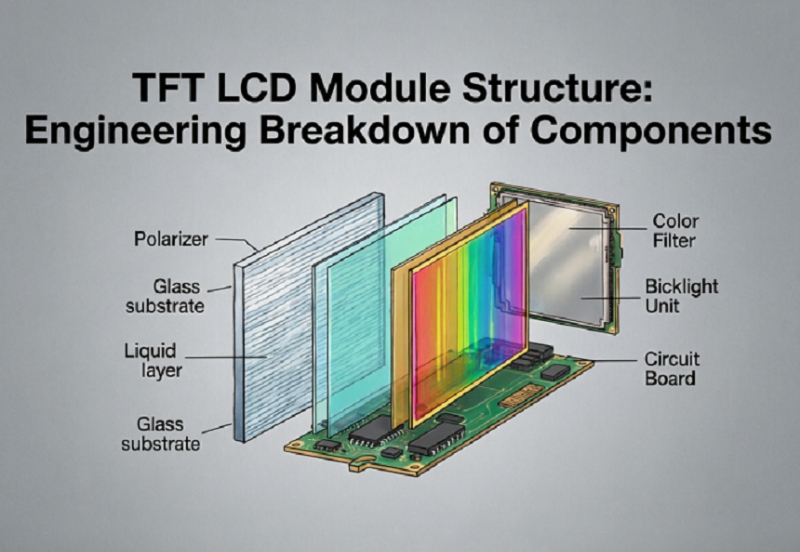
TFT LCD optical structure: contrast depends on how the full stack controls and transmits light.
For a detailed breakdown of these internal layers, read TFT LCD Module Structure: Engineering Breakdown of Components.
Contrast Class | Practical Visual Direction | Typical Use Direction |
|---|---|---|
500:1 | Adequate black/white separation for basic UI content | Simple HMIs, meters, instruments, cost-sensitive equipment |
1000:1 | Stronger dark-state separation and richer perceived depth | Industrial HMI, medical devices, smart terminals, shared-view interfaces |
1500:1+ | Deeper blacks and stronger separation under controlled lighting | Premium industrial interfaces, dark-theme UI, monitoring and image-rich equipment |
These classes are practical comparison ranges rather than universal quality grades. Real performance depends on test conditions, panel mode, viewing angle, brightness, optical treatment, and the completed product assembly.
When black leakage is lower, dark backgrounds can look deeper and UI elements can appear more clearly separated. This is useful for dark-theme HMIs, night-mode vehicle interfaces, waveform displays, monitoring dashboards, and medical instrumentation.
Strong contrast improves the visual distinction between text and background, especially for small labels, alarm indicators, and data fields.
A stronger difference between dark and bright regions can make photographs, camera feeds, and graphical interfaces appear less flat.
Important: Static contrast is only meaningful when the test conditions are comparable. Do not compare two panels solely by the headline ratio if one is measured under different luminance, viewing, or temperature conditions.
Datasheet contrast is usually measured under controlled laboratory conditions. Real equipment operates under ambient light.
When light from the environment reflects from the front surface, it raises the apparent black level. This can reduce the contrast that the user perceives even though the panel’s internal static contrast has not changed.
This is especially important for:
Outdoor kiosks
Vehicle dashboards
Factory equipment under strong overhead lighting
Marine terminals
Portable field devices
Brightness and contrast are related but different. Brightness describes how much light the display produces in a bright state. Contrast describes the ratio between bright and dark states.
A brighter backlight can improve readability in strong ambient light, but it does not automatically create deeper blacks.
A high-brightness panel can still have weak dark-state performance.
A lower-brightness panel can show excellent contrast indoors.
Outdoor readability depends on both emitted light and reflected ambient light.
For brightness-level selection, read High-Brightness vs Standard TFT Displays.
The Innolux AT070TN94 is a 7-inch 800×480 TFT LCD with a 50-pin RGB interface, anti-glare surface treatment, and a wide operating-temperature range. It is a good example of a mature industrial display where interface compatibility, temperature, viewing direction, power consumption, and optical performance all need to be reviewed together.
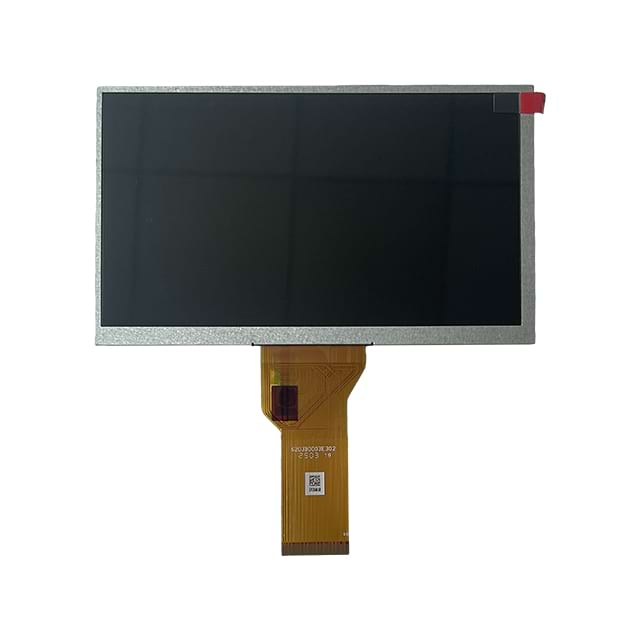
Innolux AT070TN94 — click the image to view the product page.
For a cost-sensitive HMI, a mature TN-type panel can still be a strong choice if the installation angle, viewing direction, and UI design are controlled.
To understand the tradeoff between panel modes, see IPS vs TN TFT LCD for Industrial Applications.
Panel mode affects how well contrast is maintained when the user moves away from the ideal viewing direction.
TN panels can provide good front-view performance at a competitive cost, but vertical viewing direction is more important. Contrast and grayscale can change more noticeably at off-axis positions.
IPS panels generally maintain color and contrast more consistently across wider viewing directions, which is valuable for shared-view equipment, touch interfaces, and screens mounted away from direct eye level.
The following 10.1-inch Toroson display is an example of an IPS MIPI module designed for embedded and industrial applications.
Toroson 10.1-inch 800×1280 MIPI IPS TFT LCD — click to view product details.
If installation angle is a major concern, review TFT LCD Viewing Angle Explained.
A display may show deep black in a dark laboratory but look washed out when strong ambient light reflects from the front surface.
Factors that reduce outdoor contrast include:
Glossy cover glass
Air gaps between LCD and touch panel
High-reflectance touch layers
Direct sunlight
Poor enclosure shading
Fingerprints and contamination
An air-bonded touch display has reflective interfaces between the LCD, air, and cover glass. Optical bonding replaces the air gap with a transparent optical adhesive.
This can reduce internal reflection and improve perceived contrast in bright environments. It does not change the fundamental liquid crystal static contrast ratio, but it can improve the contrast the user actually experiences under ambient light.
Read Anti-Glare vs Anti-Reflective vs Optical Bonding for a complete optical comparison.
Treatment | Main Function | Tradeoff |
|---|---|---|
AG | Scatters reflected light to reduce mirror-like glare | Can slightly soften image appearance depending on haze level |
AR | Reduces surface reflection through optical coating | Coating cost and durability must match the application |
For direct-sunlight equipment, brightness, reflection control, touch integration, and contrast must be evaluated as one optical system.
The Toroson TI070IPK01 is a 7-inch 1200×1920 MIPI display with PCAP and a typical brightness listed at 2500 cd/m². Its product page positions it for outdoor kiosks, rugged tablets, industrial instrumentation, and transportation displays.
Toroson 7-inch high-brightness MIPI display with PCAP — click to view the product page.
A high-brightness module like this should still be tested in the final enclosure because front glass, touch layers, reflections, temperature, and viewing direction influence final perceived contrast.
Liquid crystal optical behavior changes with temperature. At low temperatures, response can slow and dark/bright transition behavior can change. At elevated temperatures, black level, color, polarizer behavior, and overall optical stability may also shift.
For wide-temperature equipment, never assume the room-temperature contrast specification will remain visually identical across the complete operating range.
For thermal design considerations, read Operating Temperature Range for Industrial Displays Explained.
Contrast and response time describe different characteristics:
Contrast ratio: how strongly bright and dark states are separated.
Response time: how quickly the pixel moves between optical states.
A high-contrast panel can still have slow motion transitions. A fast-response panel can still have moderate contrast.
If your application displays moving graphs, video, camera feeds, or animated gauges, use the TFT LCD Response Time Guide together with the contrast specification.
Application | Contrast Priority | What Else to Check |
|---|---|---|
Basic machine HMI | Moderate | Viewing direction, cost, interface, temperature |
Medical monitoring | High | Color stability, viewing angle, brightness consistency |
Automotive display | High | Day/night dimming, temperature, reflection, response time |
Outdoor kiosk | High real-world contrast | Brightness, AR/AG, bonding, thermal management |
Camera monitor | High | Response time, color, resolution, controller latency |
A buyer chooses the highest contrast specification without checking brightness, interface, temperature, viewing angle, or mechanical compatibility.
Better approach: Treat contrast as one part of a complete panel specification.
Two datasheets use different measurement methods or temperatures.
Better approach: Review footnotes and test conditions before comparing the ratios.
A powerful backlight raises white luminance but may not improve the black state proportionally.
Better approach: Evaluate brightness and contrast separately.
The front-view contrast looks excellent, but the installed panel is viewed from below or from the side.
Better approach: Validate contrast at the real installation angle.
The bare LCD performs well but the finished product looks washed out under ambient light.
Better approach: Test the complete optical stack.
Application and user viewing position
Panel mode: TN, IPS, VA, or other
Contrast ratio and test conditions
Brightness requirement
Viewing angle
Ambient light level
Touch structure
Optical bonding requirement
AG / AR surface treatment
Operating temperature
Resolution and interface
Power budget
Expected supply lifecycle
For many industrial TFT LCD applications, 1000:1 provides strong visual separation. Final suitability still depends on viewing angle, ambient light, brightness, touch structure, and application requirements.
Not always. A 1500:1 panel may have disadvantages in cost, interface, temperature, brightness, response time, or mechanical fit. Compare the complete specification.
IPS commonly provides more stable contrast across wider viewing angles. The actual front-view contrast ratio depends on the specific panel design.
Not automatically. Increasing white luminance does not guarantee that the black level improves by the same proportion.
Ambient reflections can raise the apparent black level and reduce perceived contrast. High brightness, optical bonding, AR/AG treatment, and enclosure shading can help.
It does not directly change the LCD cell’s static contrast ratio, but it can reduce internal reflection and improve perceived contrast under ambient light.
Yes. Some panel types lose contrast more quickly when viewed away from the preferred direction, which is why installation angle should be tested.
Yes. Liquid crystal behavior, black level, response, polarizers, and other optical characteristics can change across the temperature range.
There is no single static ratio that guarantees outdoor readability. Evaluate high brightness, ambient reflection, bonding, AR/AG treatment, viewing angle, and thermal design together.
Provide screen size, resolution, interface, brightness, contrast target, viewing angle, ambient environment, temperature range, touch requirement, mechanical restrictions, and expected quantity.
LCD contrast ratio is an important specification, but it should not be used as a standalone ranking number.
For indoor industrial HMIs, a moderate contrast panel can perform very well when the viewing direction and UI are controlled. For medical, monitoring, and shared-view applications, stronger contrast and wide viewing stability are more valuable. For outdoor equipment, apparent contrast under ambient light becomes more important than the static laboratory figure.
The best selection method is to evaluate contrast together with brightness, panel mode, viewing angle, surface reflection, touch structure, optical bonding, temperature, interface, power consumption, and long-term supply.
Send the LCD size, resolution, contrast requirement, brightness target, viewing angle, operating environment, temperature range, touch structure, interface, mechanical limits, and expected quantity. Toroson can help compare industrial TFT LCD options and recommend a suitable display for your OEM project.


